
Topic Model API and Usage
A Consistent Workflow Across Topic-Model Backends
by Francesco Grossetti
Source:vignettes/topic-model-api.Rmd
topic-model-api.RmdTopic models are useful, but the R ecosystem exposes them through several different object types, argument names, and output formats. That makes it harder than it should be to compare models, reuse diagnostics, or move a workflow from one backend to another.
NLPstudio’s topic-model API is built to remove that friction. The package gives you one workflow for fitting, inspecting, predicting, evaluating, selecting, and summarizing topic models. The backend can change, but the main verbs and the standardized outputs stay the same.
This vignette walks through that workflow from start to finish. We
will prepare a small corpus, fit one topic model, inspect the
standardized outputs, evaluate the model, compare candidate values of
k, assess seed stability, build an interpretation table,
and sketch how the same calls transfer to other engines.
The notation follows Lewis and Grossetti (2022). In particular, this vignette uses DTW for document-topic weights and TWW for topic-word weights. Those two tables are the main package-standard representation of a fitted topic model: DTW describes documents in the topic space, while TWW describes topics in the vocabulary space.
The package currently supports topic models from text2vec, topicmodels, seededlda, optionally stm, and optionally topicmodels.etm. To keep this vignette fast and reliable during package checks, only the topicmodels examples are evaluated. The other backend sections are included as non-evaluated templates so you can see the same API shape without requiring every optional backend on your machine.
Public API Stability
NLPstudio v1.0.0 freezes the core topic-model output
shapes as public contracts. An nlp_topic_fit stores the
standardized model pieces, evaluate_topic_model() and
select_k_topics() return long tables with stable metric
columns, assess_topic_stability() returns matched-topic
stability rows, and the topic summary helpers return one row per
topic.
One practical consequence is that evaluation and selection tables
retain the same standard columns even when a result is aggregate-only.
The columns metric, level,
topic_id, value, and supported
stay present; aggregate rows use topic_id = NA rather than
dropping the column. This makes joins, plots, exports, and downstream
summaries predictable.
New code should also use only the final metric names. For example,
request held_out_perplexity explicitly rather than the
removed "perplexity" alias.
Prepare Data Once
The workflow starts with ordinary data: one row per document, one text column, and any metadata that helps interpret the documents later. Here the metadata is minimal, but the same pattern works with richer document-level fields such as firm identifiers, filing dates, industries, countries, or human-coded labels.
Topic models are estimated from a document-feature matrix. The metadata does not enter the model directly in this example, but we keep it next to the model so it can be returned by downstream helpers. That is what lets later calls attach text, groups, and document identifiers to predictions, representative documents, and summary tables.
library(NLPstudio)
#> ── NLPstudio 1.2.0 ────────────────── https://github.com/contefranz/NLPstudio ──
#> Core imports: cli, data.table, ggplot2, Matrix, methods, quanteda,
#>               quanteda.textstats
#> Optional backends: text2vec, topicmodels, seededlda, stm,
#>                    topicmodels.etm, torch, spacyr, tidytext,
#>                    RcppSimdJson, uwot
#> Use library(<pkg>) to attach any of these to your session.
#> Optional packages are only needed for the functions that use them.
library(quanteda)
#> Package version: 4.4
#> Unicode version: 15.1
#> ICU version: 74.2
#> Parallel computing: disabled
#> See https://quanteda.io for tutorials and examples.

docs <- data.frame(
  doc_id = paste0("doc", 1:10),
  text = c(
    "Revenue growth improved after subscription demand increased.",
    "Recurring software revenue supported customer retention.",
    "Cloud infrastructure costs declined and operating margin expanded.",
    "Capital allocation reflected debt covenants and interest expense.",
    "Audit committee oversight focused on internal control remediation.",
    "Risk disclosures emphasized liquidity and refinancing pressure.",
    "Cybersecurity controls shaped technology governance disclosures.",
    "Management discussed compliance monitoring and reporting quality.",
    "Subscription renewals improved annual recurring revenue trends.",
    "Debt refinancing reduced interest expense and liquidity risk."
  ),
  group = rep(c("performance", "governance"), each = 5),
  stringsAsFactors = FALSE
)

corp <- quanteda::corpus(docs, text_field = "text", docid_field = "doc_id")
toks <- quanteda::tokens(corp, remove_punct = TRUE)
toks <- quanteda::tokens_tolower(toks)
toks <- quanteda::tokens_remove(toks, pattern = quanteda::stopwords("en"))
dfm <- quanteda::dfm(toks)
dfm
#> Document-feature matrix of: 10 documents, 53 features (87.74% sparse) and 1 docvar.
#>       features
#> docs   revenue growth improved subscription demand increased recurring software
#>   doc1       1      1        1            1      1         1         0        0
#>   doc2       1      0        0            0      0         0         1        1
#>   doc3       0      0        0            0      0         0         0        0
#>   doc4       0      0        0            0      0         0         0        0
#>   doc5       0      0        0            0      0         0         0        0
#>   doc6       0      0        0            0      0         0         0        0
#>       features
#> docs   supported customer
#>   doc1         0        0
#>   doc2         1        1
#>   doc3         0        0
#>   doc4         0        0
#>   doc5         0        0
#>   doc6         0        0
#> [ reached max_ndoc ... 4 more documents, reached max_nfeat ... 43 more features ]
Fit One Model
fit_topic_model() is the basic modeling verb. One call
means one model specification: one input matrix, one engine, one model
family, one value of k, and one set of backend
controls.
The object returned by fit_topic_model() is an
nlp_topic_fit. It keeps the original backend model, but it
also stores the package-owned pieces that make the rest of the API
consistent: document-topic weights (DTW), topic-word weights (TWW),
stable topic identifiers, the fitted vocabulary, optional document
metadata, backend controls, and available hyperparameters.
fit <- fit_topic_model(
  dfm,
  engine = "topicmodels",
  model = "lda",
  method = "Gibbs",
  k = 2,
  doc_data = docs,
  control = list(fit = list(seed = 1L, iter = 75L, burnin = 0L, thin = 1L))
)

fit
#> <nlp_topic_fit>
#>   engine: topicmodels
#>   model: lda (Gibbs)
#>   documents: 10
#>   topics: 2
#>   terms: 53
#>   cached DTW: TRUE
#>   cached TWW: TRUE
#>   stored docvars: TRUE
#>   stored doc_data: TRUE
The printed object is intentionally compact. It tells you what was fit and gives you enough context to confirm that the model has the expected engine, model family, topic count, document count, and vocabulary size.
Notice the topic labels. Standardized outputs use identifiers such as
Topic001 and Topic002. Those labels are
generated by NLPstudio rather than by a specific backend, which is what
allows the same helper functions to work across engines.
Inspect Standardized Outputs
After fitting, the first question is usually: “What did the model learn?” NLPstudio answers that with two standardized tables.
Use get_dtw() for document-topic weights. Each row
corresponds to a document, and the Topic### columns
describe how much of that document is associated with each topic. Use
get_tww() for topic-word weights. Each row corresponds to a
topic, and the columns describe the topic’s distribution over the fitted
vocabulary.
dtw <- get_dtw(fit, docvars = TRUE, include_text = TRUE)
tww <- get_tww(fit)

head(dtw)
#>    doc_id       group  Topic001  Topic002 topic_max_id topic_max_int
#>    <char>      <char>     <num>     <num>       <char>         <int>
#> 1:   doc1 performance 0.4642857 0.5357143     Topic002             2
#> 2:   doc2 performance 0.5000000 0.5000000     Topic001             1
#> 3:   doc3 performance 0.4561404 0.5438596     Topic002             2
#> 4:   doc4 performance 0.5614035 0.4385965     Topic001             1
#> 5:   doc5 performance 0.4912281 0.5087719     Topic002             2
#> 6:   doc6  governance 0.5000000 0.5000000     Topic001             1
#>    topic_max_value
#>              <num>
#> 1:       0.5357143
#> 2:       0.5000000
#> 3:       0.5438596
#> 4:       0.5614035
#> 5:       0.5087719
#> 6:       0.5000000
#>                                                                  text
#>                                                                <char>
#> 1:       Revenue growth improved after subscription demand increased.
#> 2:           Recurring software revenue supported customer retention.
#> 3: Cloud infrastructure costs declined and operating margin expanded.
#> 4:  Capital allocation reflected debt covenants and interest expense.
#> 5: Audit committee oversight focused on internal control remediation.
#> 6:    Risk disclosures emphasized liquidity and refinancing pressure.
tww[, 1:6, with = FALSE]
#>    topic_id     revenue      growth    improved subscription      demand
#>      <char>       <num>       <num>       <num>        <num>       <num>
#> 1: Topic001 0.002680965 0.002680965 0.002680965  0.002680965 0.029490617
#> 2: Topic002 0.080939948 0.028720627 0.054830287  0.054830287 0.002610966
The full TWW matrix is useful for computation, but it is often too
wide for human reading. When the goal is interpretation,
get_top_terms() returns the most important words for each
topic in either long or wide format. It accepts a fitted model or a TWW
table, so you can use it early in exploration or later in a reporting
pipeline.
top_terms <- get_top_terms(fit, n = 5, format = "long")
top_terms
#>      rank    topic         term probability
#>     <int>   <char>       <char>       <num>
#>  1:     1 Topic001         debt  0.05630027
#>  2:     2 Topic001     interest  0.05630027
#>  3:     3 Topic001      expense  0.05630027
#>  4:     4 Topic001         risk  0.05630027
#>  5:     5 Topic001    liquidity  0.05630027
#>  6:     1 Topic002      revenue  0.08093995
#>  7:     2 Topic002     improved  0.05483029
#>  8:     3 Topic002 subscription  0.05483029
#>  9:     4 Topic002    recurring  0.05483029
#> 10:     5 Topic002  disclosures  0.05483029

get_top_terms(tww, n = 3, format = "wide")
#>     rank Topic001_term Topic001_prob Topic002_term Topic002_prob
#>    <int>        <char>         <num>        <char>         <num>
#> 1:     1          debt    0.05630027       revenue    0.08093995
#> 2:     2      interest    0.05630027      improved    0.05483029
#> 3:     3       expense    0.05630027  subscription    0.05483029
Some engines expose topic-model hyperparameters, while others expose
only part of that information. NLPstudio returns what is available
through get_topic_hyperparameters() in a backend-neutral
table. The original backend controls are still stored on
fit$backend_control, which is helpful when you need to
audit exactly how a model was estimated.
get_topic_hyperparameters(fit)
#>    parameter  value source_section source_name
#>       <char> <AsIs>         <char>      <char>
#> 1:         k      2       argument           k
#> 2:     alpha     25   model_object       alpha
#> 3:      beta    0.1            fit       delta
Interpret Topics
Topic interpretation usually combines two views. The first is lexical: which words define the topic? The second is documentary: which documents are strongest examples of the topic?
For the lexical view, plot_top_terms() uses the long
output from get_top_terms(). The plot is a quick check on
whether the discovered topics look distinct and interpretable.
plot_top_terms(top_terms)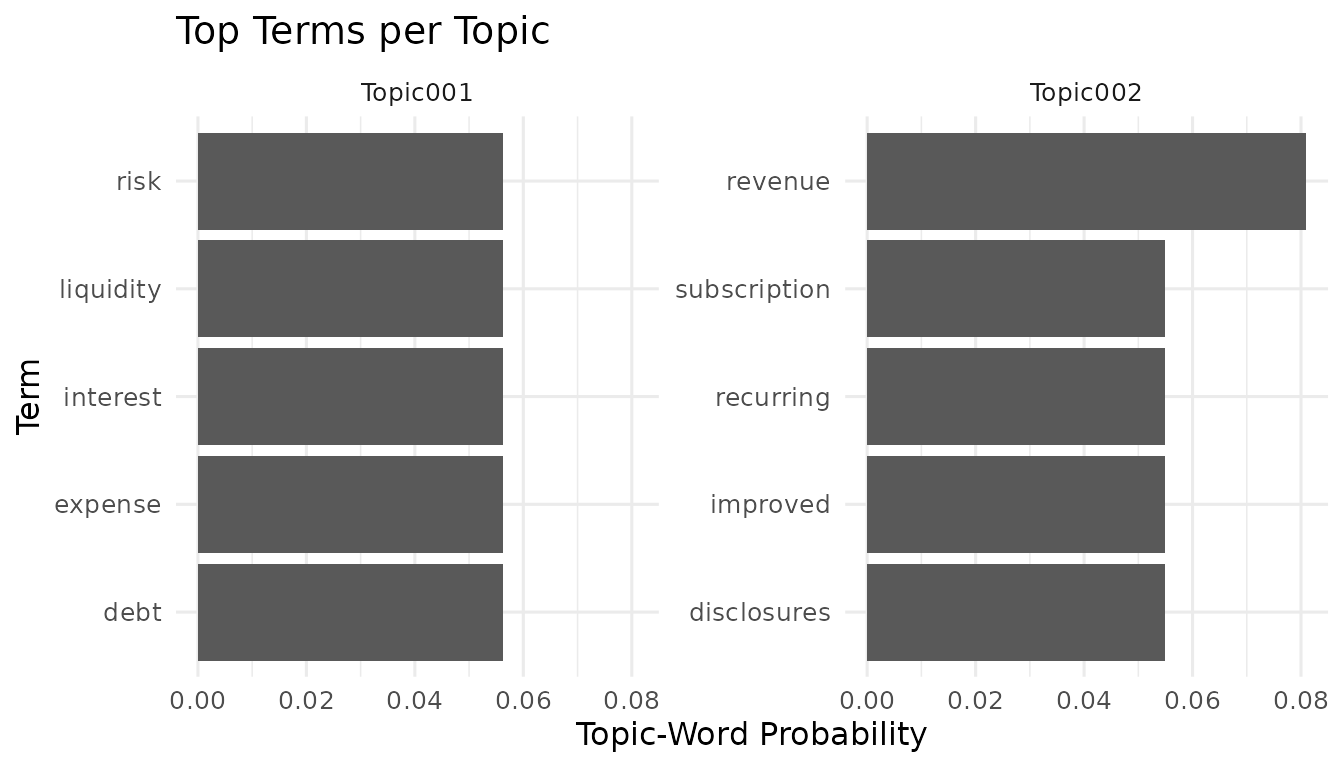
plot_dtw() gives the document-side view. It shows how
topic weights are spread across documents, which helps you see whether
the fitted topics dominate a few documents, appear broadly across the
corpus, or remain very diffuse.
plot_dtw(fit)
#> `stat_bin()` using `bins = 30`. Pick better value `binwidth`.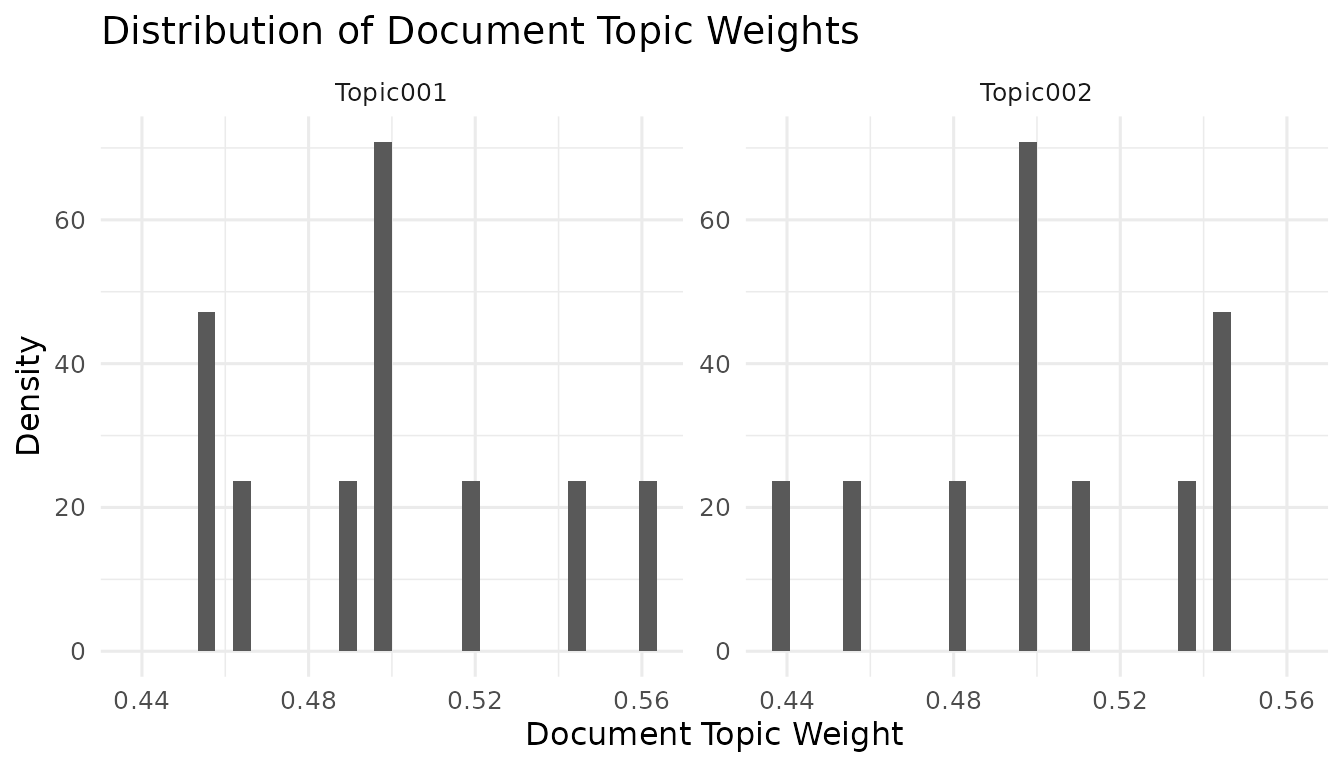
Representative documents are often the easiest way to name and
validate a topic. get_representative_candidates() ranks
documents by their dominant topic weight and assigns simple candidate
bands. If metadata or text are available, the function can return them
with the ranking so you can inspect the examples in context.
representatives <- get_representative_candidates(
  fit,
  doc_data = docs,
  include_text = TRUE
)

representatives[
  ,
  .(doc_id, topic_max_id, topic_max_value, candidate_band, topic_rank, text)
]
#>     doc_id topic_max_id topic_max_value candidate_band topic_rank
#>     <char>       <char>           <num>         <char>      <int>
#>  1:   doc4     Topic001       0.5614035          VHIGH          1
#>  2:  doc10     Topic001       0.5438596           HIGH          2
#>  3:   doc8     Topic001       0.5178571           HIGH          3
#>  4:   doc2     Topic001       0.5000000           VLOW          4
#>  5:   doc6     Topic001       0.5000000           VLOW          5
#>  6:   doc7     Topic001       0.5000000            LOW          6
#>  7:   doc3     Topic002       0.5438596           HIGH          1
#>  8:   doc9     Topic002       0.5438596          VHIGH          2
#>  9:   doc1     Topic002       0.5357143            LOW          3
#> 10:   doc5     Topic002       0.5087719           VLOW          4
#>                                                                   text
#>                                                                 <char>
#>  1:  Capital allocation reflected debt covenants and interest expense.
#>  2:      Debt refinancing reduced interest expense and liquidity risk.
#>  3:  Management discussed compliance monitoring and reporting quality.
#>  4:           Recurring software revenue supported customer retention.
#>  5:    Risk disclosures emphasized liquidity and refinancing pressure.
#>  6:   Cybersecurity controls shaped technology governance disclosures.
#>  7: Cloud infrastructure costs declined and operating margin expanded.
#>  8:    Subscription renewals improved annual recurring revenue trends.
#>  9:       Revenue growth improved after subscription demand increased.
#> 10: Audit committee oversight focused on internal control remediation.
Predict New Documents
Once a model is fit, you may want to score new documents against the
same topic space. predict_topic_model() handles the
practical detail that new documents rarely have exactly the same
vocabulary columns as the training matrix. The new input is aligned to
the fitted vocabulary before backend prediction, and the returned DTW
table uses the same Topic### naming contract as the fitted
model.
new_docs <- data.frame(
  doc_id = paste0("new", 1:3),
  text = c(
    "Recurring revenue improved after subscription renewals.",
    "Audit remediation and compliance controls remained a priority.",
    "Debt refinancing lowered liquidity risk and interest expense."
  ),
  source = c("forecast", "governance", "capital"),
  stringsAsFactors = FALSE
)

new_corp <- quanteda::corpus(new_docs, text_field = "text", docid_field = "doc_id")
new_toks <- quanteda::tokens(new_corp, remove_punct = TRUE)
new_toks <- quanteda::tokens_tolower(new_toks)
new_toks <- quanteda::tokens_remove(new_toks, pattern = quanteda::stopwords("en"))
new_dfm <- quanteda::dfm(new_toks)

pred <- predict_topic_model(
  fit,
  new_dfm,
  doc_data = new_docs,
  include_text = TRUE
)
#> Warning: Dropping 3 terms that were not found in the fitted vocabulary.

pred
#>    doc_id     source  Topic001  Topic002 topic_max_id topic_max_int
#>    <char>     <char>     <num>     <num>       <char>         <int>
#> 1:   new1   forecast 0.4545455 0.5454545     Topic002             2
#> 2:   new2 governance 0.5000000 0.5000000     Topic001             1
#> 3:   new3    capital 0.5357143 0.4642857     Topic001             1
#>    topic_max_value
#>              <num>
#> 1:       0.5454545
#> 2:       0.5000000
#> 3:       0.5357143
#>                                                              text
#>                                                            <char>
#> 1:        Recurring revenue improved after subscription renewals.
#> 2: Audit remediation and compliance controls remained a priority.
#> 3:  Debt refinancing lowered liquidity risk and interest expense.
Evaluate Model Quality
Interpretability is not only visual.
evaluate_topic_model() collects common quality metrics into
one long-format table so they can be compared, plotted, or joined to
model-selection results. Some metrics summarize the whole model; others
are defined topic by topic. Setting level = "all" returns
both where available.
evaluation <- evaluate_topic_model(
  fit,
  training = dfm,
  metrics = c("coherence_umass", "diversity", "exclusivity", "train_perplexity"),
  top_n = 5L,
  level = "all"
)

evaluation
#>              metric     level topic_id       value supported
#>              <char>    <char>   <char>       <num>    <lgcl>
#> 1:  coherence_umass aggregate     <NA>  -6.0231856      TRUE
#> 2:  coherence_umass     topic Topic001  -0.4158883      TRUE
#> 3:  coherence_umass     topic Topic002 -11.6304828      TRUE
#> 4:        diversity aggregate     <NA>   1.0000000      TRUE
#> 5:      exclusivity aggregate     <NA>   0.9559872      TRUE
#> 6:      exclusivity     topic Topic001   0.9556797      TRUE
#> 7:      exclusivity     topic Topic002   0.9562947      TRUE
#> 8: train_perplexity aggregate     <NA>  48.3734452      TRUE
Select K
Choosing the number of topics is a modeling decision, not just a
software argument. select_k_topics() makes that decision
easier to inspect by fitting a grid of candidate topic counts and
returning the requested metrics in one selection table.
This section is a short tour of the verb. The dedicated Choosing the Number of Topics article covers
the full selection workflow on a real corpus: reading the evidence,
plotting the trade-offs, evaluating a chosen model in depth, assessing
seed stability, and running the OpTop statistical test for
k.
The default behavior remains the simple path: fit each value of
k once and evaluate it. When stability_seeds
is supplied, each candidate k is also refit across those
seeds. The selection table then includes aggregate stability, and the
full stability details are attached as an attribute for deeper
inspection.
k_selection <- select_k_topics(
  dfm,
  engine = "topicmodels",
  model = "lda",
  method = "Gibbs",
  k_grid = 2:3,
  metrics = c("coherence_umass", "diversity", "exclusivity"),
  top_n = 5L,
  holdout = 0,
  seed = 10L,
  stability_seeds = c(1L, 2L),
  control = list(fit = list(iter = 75L, burnin = 0L, thin = 1L))
)

k_selection
#> <nlp_k_selection>
#>   K grid:  2, 3
#>   metrics: coherence_umass, diversity, exclusivity, stability
#>
#>   stability: included
#>
#>   Best K per metric (aggregate level):
#>     coherence_umass      K = 3  (-17.21)
#>     diversity            K = 2  (1) [tied]
#>     exclusivity          K = 2  (0.9523)
#>     stability            K = 2  (0.6858)
attr(k_selection, "stability")$k2
#> <nlp_topic_stability>
#>   K: 2
#>   runs compared: 1
#>   aggregate stability: 0.6858
For reporting, the long selection table is often too detailed. A
paper or appendix usually needs one row per candidate k,
with the aggregate evidence side by side.
summarize_k_selection() creates that table and preserves
topic-level rows as an attribute when they are present.
k_report <- summarize_k_selection(k_selection)
k_report
#> <nlp_k_selection_summary>
#>   candidate K values: 2, 3
#>   columns: coherence_umass, diversity, exclusivity, stability
#>   OpTop: not included
Assess Stability Directly
Topic models can move when the random seed changes. That does not necessarily mean a model is bad, but it is information you should see before treating topic labels as stable research objects.
assess_topic_stability() makes that check explicit. In
the automatic workflow, it repeatedly calls
fit_topic_model() with the same model specification and
different seeds. Unless you supply resampling, the seed is
the only thing that changes across runs.
Topic labels are arbitrary across repeated runs. A topic called
Topic001 in one seed may correspond to
Topic002 in another seed. The stability helper therefore
extracts standardized TWW from each run, aligns vocabularies, matches
topics across runs, and reports matched-topic cosine similarities.
stability <- assess_topic_stability(
  dfm,
  engine = "topicmodels",
  model = "lda",
  method = "Gibbs",
  k = 2,
  seeds = 1:3,
  control = list(fit = list(iter = 75L, burnin = 0L, thin = 1L))
)

stability
#> <nlp_topic_stability>
#>   K: 2
#>   runs compared: 2
#>   aggregate stability: 0.6385
If you prefer to fit models yourself, you can still use the same
matching and scoring code. Pass a list of nlp_topic_fit
objects, and assess_topic_stability() will skip fitting and
move directly to standardized TWW extraction, topic matching, and
stability scoring.
fits <- lapply(1:3, function(seed) {
  fit_topic_model(
    dfm,
    engine = "topicmodels",
    model = "lda",
    method = "Gibbs",
    k = 2,
    control = list(fit = list(seed = seed, iter = 75L, burnin = 0L, thin = 1L))
  )
})

assess_topic_stability(fits, seeds = 1:3)
#> <nlp_topic_stability>
#>   K: 2
#>   runs compared: 2
#>   aggregate stability: 0.6385
Summarize and Export
After fitting, inspecting, evaluating, and checking stability, the
next step is usually a table that can be reviewed, exported, or adapted
for a paper appendix. summarize_topics() builds that table
directly from the fitted object. It returns one row per topic with top
terms, top-term probabilities, topic prevalence, available metrics,
representative documents, and optional text or metadata.
topic_summary <- summarize_topics(
  fit,
  training = dfm,
  doc_data = docs,
  top_n = 5L,
  representative_n = 2L,
  include_text = TRUE
)

topic_summary
#>    topic_id topic_int                                               top_terms
#>      <char>     <int>                                                  <char>
#> 1: Topic001         1                debt, interest, expense, risk, liquidity
#> 2: Topic002         2 revenue, improved, subscription, recurring, disclosures
#>                                   top_term_probabilities prevalence
#>                                                   <char>      <num>
#> 1: 0.0563003, 0.0563003, 0.0563003, 0.0563003, 0.0563003  0.4990915
#> 2: 0.0809399, 0.0548303, 0.0548303, 0.0548303, 0.0548303  0.5009085
#>    coherence_npmi coherence_umass diversity exclusivity representative_doc_ids
#>             <num>           <num>     <num>       <num>                 <char>
#> 1:     0.63876401      -0.4158883         1   0.9556797            doc4, doc10
#> 2:     0.04913968     -11.6304828         1   0.9562947             doc3, doc9
#>    representative_documents
#>                      <list>
#> 1:        <data.table[2x2]>
#> 2:        <data.table[2x2]>
#>                                                                                                                      representative_text
#>                                                                                                                                   <char>
#> 1:    Capital allocation reflected debt covenants and interest expense. || Debt refinancing reduced interest expense and liquidity risk.
#> 2: Cloud infrastructure costs declined and operating margin expanded. || Subscription renewals improved annual recurring revenue trends.
The summary includes a representative_documents list
column. That is useful inside R because each topic can carry its own
small document table. For flat file exports, drop the list column and
write the remaining scalar columns.
Adopt Existing Topic Models
You do not have to refit a model just to use the current API. Many
projects already have topic models saved from earlier analyses, from
direct backend calls, or from older NLPstudio workflows.
as_nlp_topic_fit() is the adoption path for those objects.
It wraps the existing fit, standardizes the cached DTW and TWW matrices
where available, and keeps the original backend object as
model_object.
The conversion is deliberately non-refitting. For
topicmodels fits, the adapter reads the fitted
gamma, beta, terms, document IDs, controls,
and hyperparameters from the S4 object. For seededlda,
it uses the stored theta, phi, k,
alpha, and beta. For raw
text2vec WarpLDA/LDA objects, the topic-word
distribution can be recovered from the model object, but the
document-topic matrix is not stored by text2vec itself;
pass the theta matrix returned by
fit_transform() when you need DTW access.
# topicmodels::LDA() or topicmodels::CTM()
topicmodels_fit <- as_nlp_topic_fit(existing_topicmodels_fit)

# seededlda::textmodel_lda() or seededlda::textmodel_seededlda()
seededlda_fit <- as_nlp_topic_fit(existing_seededlda_fit)

# raw text2vec::LDA() / WarpLDA object
text2vec_fit <- as_nlp_topic_fit(raw_text2vec_fit, theta = saved_theta)

# sequential LDA from seededlda is not reliably distinguishable after fitting
seqlda_fit <- as_nlp_topic_fit(existing_seededlda_fit, model = "seqlda")

# stm::stm() without content covariates
stm_fit <- as_nlp_topic_fit(existing_stm_fit, doc_ids = existing_doc_ids)
Older NLPstudio projects may also contain saved outputs from the
removed warp_lda() wrapper. Those list objects usually
contain lda_object, theta, and
phi. The adapter uses theta as DTW,
phi as TWW, and keeps the original WarpLDA backend
object.
old <- readRDS("legacy-warp-lda-output.rds")
legacy_fit <- as_nlp_topic_fit(old)

get_dtw(legacy_fit)
get_tww(legacy_fit)
get_top_terms(legacy_fit, n = 10)
summarize_topics(legacy_fit, training = original_dfm)
If an adopted object is missing DTW or TWW, the adapter preserves the
parts that are available and warns about the missing cache. Functions
that need the missing component will then fail with the same messages
used by current partial nlp_topic_fit objects.
Use OpTop with NLPstudio Fits
Some research workflows select the number of topics with the
chi-square test of Lewis and Grossetti (2022), implemented in the
OpTop package. NLPstudio does not reimplement that
test; it prepares the exact objects OpTop::optop_select()
(named optimal_topic() before OpTop 0.19) expects through
as_optop_weighted_dfm() and as_optop_input(),
and folds the result back into summarize_k_selection().
Since OpTop 0.19 the test consumes nlp_topic_fit objects
natively: the statistic touches each model only through its fitted word
probabilities, so a grid built with
select_k_topics(..., return_fits = TRUE) passes straight
through, and grids may mix fitting methods provided every model was
fitted on the same corpus and vocabulary. as_optop_input()
supplies the bookkeeping - K ordering, duplicate and vocabulary checks,
and weighted-DFM alignment.
A complete, runnable OpTop example — including how its output merges
into the selection report — lives in the Choosing the Number of Topics article, the
dedicated guide to selecting k.
Backend Portability
The point of the API is that the workflow above does not belong only to one backend. The fitting controls differ by engine, but the surrounding calls stay recognizable: fit a model, extract DTW/TWW, interpret top terms, evaluate, and summarize.
The examples below are not evaluated in this vignette because optional backend availability varies across machines and CI environments. They are meant as templates for moving the same workflow to another estimator.
fit_text2vec <- fit_topic_model(
  dfm,
  engine = "text2vec",
  model = "lda",
  k = 2,
  control = list(fit = list(n_iter = 100, progressbar = FALSE))
)

get_top_terms(fit_text2vec, n = 5)
evaluate_topic_model(fit_text2vec, training = dfm, metrics = c("diversity", "exclusivity"))
fit_seededlda <- fit_topic_model(
  dfm,
  engine = "seededlda",
  model = "lda",
  k = 2
)

get_dtw(fit_seededlda)
get_tww(fit_seededlda)
Seeded LDA uses the same wrapper but requires a dictionary. Once the model is fit, the downstream accessors remain the same.
seed_dict <- quanteda::dictionary(list(
  performance = c("revenue", "subscription", "margin"),
  governance = c("audit", "control", "compliance")
))

fit_seeded <- fit_topic_model(
  dfm,
  engine = "seededlda",
  model = "seededlda",
  dictionary = seed_dict
)

summarize_topics(fit_seeded, doc_data = docs)
Structural Topic Models: Prevalence and Interpretation
Structural topic models are available through the optional
stm backend. In NLPstudio, STM is treated as an
extension of the same topic-model API rather than as a separate
workflow. That means the fitted object still has standardized DTW and
TWW outputs, stable Topic### identifiers, generic top-term
accessors, and the same topic-summary surface used by the other
backends.
The important difference is the role of document metadata. With
ordinary LDA fits, metadata can be attached after fitting so tables are
easier to read. With STM prevalence models, metadata enters the model
itself: the prevalence formula describes how document-level variables
are associated with topic proportions. That association is estimated by
the STM backend and is later reported by
estimate_stm_topic_effects().
The example below uses a document variable named group.
The call keeps docvars = TRUE so NLPstudio stores the
fitted document metadata and can reuse it when estimating topic effects.
Users can instead pass explicit metadata to
control$fit$data at fitting time, and to
estimate_stm_topic_effects() when reporting effects.
library(stm)

dfm_stm <- dfm
quanteda::docvars(dfm_stm, "group") <- docs$group

fit_stm <- fit_topic_model(
  dfm_stm,
  engine = "stm",
  model = "stm",
  k = 2,
  docvars = TRUE,
  control = list(
    fit = list(
      prevalence = ~ group,
      seed = 1L,
      max.em.its = 25L,
      init.type = "Spectral",
      verbose = FALSE
    )
  )
)
Once the model is fit, start with the same standardized outputs used
elsewhere in this vignette. get_dtw() gives document-topic
weights and can include stored docvars. get_top_terms()
reports probability-ranked terms from the standardized TWW matrix.
summarize_topics() remains the backend-agnostic
interpretation table.
get_dtw(fit_stm, docvars = TRUE)
get_top_terms(fit_stm, n = 5)
summarize_topics(fit_stm, training = dfm_stm, doc_data = docs)
STM also has label families that are useful for interpretation but
are not the same object as the standardized TWW matrix.
get_stm_topic_labels() exposes those STM-native labels in
long format. Probability labels are useful for checking the
highest-probability words. FREX, lift, and score labels emphasize
different balances between frequency and distinctiveness. NLPstudio does
not replace one with another; it returns the label family explicitly so
the choice is visible in downstream tables.
summarize_stm_topics() is the report-oriented version.
It starts from summarize_topics() and adds collapsed STM
label columns so each Topic### row can be reviewed
alongside prevalence, generic metrics, and representative documents.
get_stm_topic_labels(
  fit_stm,
  n = 5,
  label_types = c("prob", "frex", "lift", "score")
)

summarize_stm_topics(fit_stm, training = dfm_stm, doc_data = docs)
For prevalence models, the natural final question is not only “what
are the topics?” but also “how do document variables relate to topic
prevalence?” estimate_stm_topic_effects() answers that
question by calling the STM backend and returning coefficient rows in a
tidy table. The estimates should be read as model-based associations
under the fitted STM specification and the user’s covariate coding.
NLPstudio keeps the raw STM effect object attached as an attribute for
users who need backend-native follow-up analysis, but the main return
value is designed for tables and reproducible reporting.
stm_effects <- estimate_stm_topic_effects(
  fit_stm,
  topics = c("Topic001", "Topic002"),
  nsims = 25
)

stm_effects
STM limitations
STM support is intentionally bounded so the standardized outputs stay honest. Two limitations are worth stating explicitly:
-
Prevalence covariates: supported. Each topic still
has a single topic-word distribution, so the standardized TWW contract
remains valid and
estimate_stm_topic_effects()reports prevalence effects. - Content covariates: not supported. They let word distributions vary by covariate level, so a single ordinary TWW row per topic would hide part of the fitted model. NLPstudio rejects content covariates rather than returning a TWW that misrepresents the fit.
-
Prediction for prevalence fits: not inferred
automatically. New-document prediction would need explicit
new-document covariate handling, so NLPstudio returns a clear error
instead of silently guessing; use
stm::fitNewDocuments()directly when you need it.
These are deliberate design choices for the current release, not defects.
Optional ETM Extensions
Embedded topic models are an optional advanced path. They are available when topicmodels.etm, torch, and a working torch backend are installed. ETM fits still use the same downstream accessors for DTW, TWW, top terms, prediction, evaluation, and summaries. They also expose ETM-specific topic and term embeddings when those are present on the fitted object.
library(topicmodels.etm)

fit_etm <- fit_topic_model(
  dfm,
  engine = "topicmodels.etm",
  model = "etm",
  k = 2,
  control = list(
    model = list(embeddings = 50L),
    fit = list(epochs = 10L, batch_size = 8L)
  )
)

get_topic_embeddings(fit_etm)
get_term_embeddings(fit_etm)
plot_topic_embeddings(fit_etm, top_n = 10)
API Map
The main topic-model API is intentionally layered. You can use only the pieces you need, but the functions are designed to compose into one continuous workflow:
| Task | Primary function |
|---|---|
| Fit one model | fit_topic_model() |
| Fit STM prevalence models | fit_topic_model(engine = "stm", model = "stm") |
| Extract DTW/TWW |
get_dtw(), get_tww()
|
| Interpret terms and documents |
get_top_terms(), get_stm_topic_labels(),
get_representative_candidates()
|
| Plot standardized outputs |
plot_top_terms(), plot_dtw()
|
| Predict new documents | predict_topic_model() |
| Evaluate quality | evaluate_topic_model() |
| Select K | select_k_topics() |
| Report K-selection evidence | summarize_k_selection() |
| Assess seed stability | assess_topic_stability() |
| Build interpretation tables |
summarize_topics(),
summarize_stm_topics()
|
| Report STM prevalence effects | estimate_stm_topic_effects() |
| Adopt existing topic-model fits | as_nlp_topic_fit() |
| Prepare OpTop inputs |
as_optop_weighted_dfm(),
as_optop_input()
|
| Use ETM embeddings |
get_topic_embeddings(),
get_term_embeddings(),
plot_topic_embeddings()
|
References
Aletras, N., & Stevenson, M. (2013). Evaluating topic coherence using distributional semantics. Proceedings of the 14th Conference of the European Chapter of the Association for Computational Linguistics, 13-22.
Blei, D. M., Ng, A. Y., & Jordan, M. I. (2003). Latent Dirichlet Allocation. Journal of Machine Learning Research, 3, 993-1022.
Blei, D. M., & Lafferty, J. D. (2006). Correlated topic models. Advances in Neural Information Processing Systems, 18, 147.
Blei, D. M., & Lafferty, J. D. (2007). A correlated topic model of Science. The Annals of Applied Statistics, 1(1), 17-35.
Chen, J., Li, K., Zhu, J., & Chen, W. (2016). WarpLDA: A Cache Efficient O(1) Algorithm for Latent Dirichlet Allocation. Proceedings of the VLDB Endowment, 9(10), 744-755.
Dieng, A. B., Ruiz, F. J. R., & Blei, D. M. (2020). Topic Modeling in Embedding Spaces. Transactions of the Association for Computational Linguistics, 8, 439-453.
Du, L., Buntine, W. L., Jin, H., & Chen, C. (2012). Sequential latent Dirichlet allocation. Knowledge and Information Systems, 31(3), 475-503.
Jagarlamudi, J., Daume III, H., & Udupa, R. (2012). Incorporating lexical priors into topic models. In Proceedings of the 13th Conference of the European Chapter of the Association for Computational Linguistics, 204-213.
Lewis, C. M., & Grossetti, F. (2022). A statistical approach for optimal topic model identification. Journal of Machine Learning Research, 23(58), 1-20.
Lu, B., Ott, M., Cardie, C., & Tsou, B. K. (2011). Multi-aspect sentiment analysis with topic models. In 2011 IEEE 11th International Conference on Data Mining Workshops, 81-88.
Mimno, D., Wallach, H., Talley, E., Leenders, M., & McCallum, A. (2011). Optimizing semantic coherence in topic models. Proceedings of the 2011 Conference on Empirical Methods in Natural Language Processing, 262-272.
Roberts, M. E., Stewart, B. M., Tingley, D., Lucas, C., Leder-Luis, J., Gadarian, S. K., Albertson, B., & Rand, D. G. (2014). Structural topic models for open-ended survey responses. American Journal of Political Science, 58(4), 1064-1082.
Watanabe, K., & Zhou, Y. (2022). Theory-Driven Analysis of Large Corpora: Semisupervised Topic Classification of the UN Speeches. Social Science Computer Review, 40(2), 346-366. https://doi.org/10.1177/0894439320907027.
Watanabe, K., & Baturo, A. (2024). Seeded Sequential LDA: A Semi-Supervised Algorithm for Topic-Specific Analysis of Sentences. Social Science Computer Review, 42(1), 224-248. https://doi.org/10.1177/08944393231178605.